Turtle Spiral
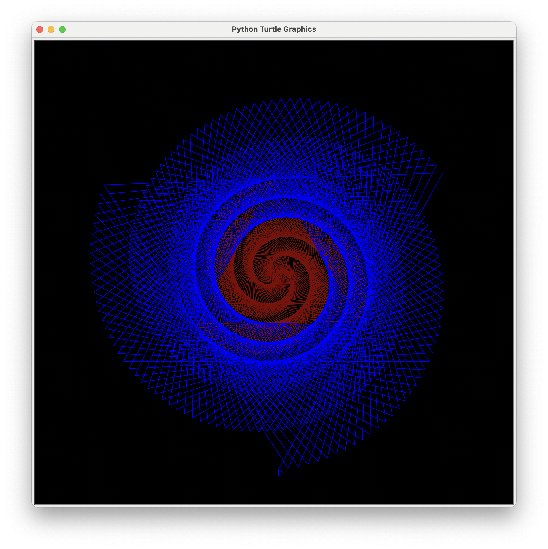
We're going to draw this spiral in NPA colors. Reading the directions, it looks like an enormous amount of typing — which is exactly the problem loops were invented to solve.
Overview
You'll draw a spiral, first by understanding the algorithm, then by teaching Python to repeat it with a while loop, tightening it into a for loop, and finally using if…else to switch colors partway through.
You've got it when…
- Your spiral draws itself with a loop instead of hundreds of lines.
- It runs 600 turns using a
forloop andrange(). - It draws the first 300 turns in maroon and the rest in blue.
Collaboration & AI
Work: On your own. Compare with a neighbor, but write your own loop.
AI — AIAS Level 1, No AI: Loops are the whole point here; reason them out yourself. What the levels mean.
Spiraling Into Madness
Start with this code.
Here's the algorithm to draw the spiral:
- Set the pen color to "maroon".
- Walk in a pattern:
- Walk forward 1 step.
- Turn right 121 degrees.
- Walk forward 2 steps.
- Turn right 121 degrees.
- Walk forward 3 steps.
- Turn right 121 degrees.
- …and so on.
- Repeat this pattern, increasing the number of steps by one each move, 300 times.
- Change the pen color to "blue" and continue the pattern 300 more times.
Simple, right? Here are the commands you'll need:
| Command | Description |
|---|---|
turtle.forward(distance) |
Move forward by distance. |
turtle.right(angle) |
Turn right by angle degrees. |
turtle.pencolor(colorstring) |
Set the pen color. |
turtle.bgcolor(color) |
Set the background color. |
While Loop
Writing out hundreds of lines is painful for humans. Computers are great at doing the same thing over and over. Notice the two commands that repeat in the algorithm: walk forward and turn right. We can write them once and tell Python to loop them.
Read the syntax for a while loop, then loop the two turtle commands 600 times to draw the spiral in a single color.
Checkpoint
Submit a copy of your program (.py) at this point.
For Loop
In the while loop, you used a counter variable, i, to track how many times
the loop ran and how many steps to take. Counting loop iterations is so
common that Python has a loop just for it: the for loop.
Read the syntax for a for loop,
focusing on the range() function, then rewrite your program to use a for loop
instead of a while loop.
Checkpoint
Submit a copy of your program (.py) at this point.
If…Else
We're almost done, but we need to switch the pen color from maroon to blue when we're 300 turns into the 600-turn loop. The program has to make a decision based on a condition — called selection.
Read the syntax for conditionals and if…else, then add code inside your loop to do this:
- If the loop has run fewer than 300 times, set the pen color to "maroon".
- Else set the pen color to "blue".
Turn It In
- Your finished spiral program (
.py).
How It's Graded
This lab is worth up to 4 points. One score covers everything you turn in.
| Score | What it looks like |
|---|---|
| 4 — Excellent | Your finished program draws the full 600-turn spiral with a for loop and range(), switches from maroon to blue at turn 300 with an if…else inside the loop, and both checkpoint versions (while, then for) were submitted along the way — the progression is visible, not just the destination. |
| 3 — Above Average | The finished spiral draws correctly, with a minor slip — a checkpoint missed, the colors swapped, or the switch a turn or two off. |
| 2 — Average | A loop draws the spiral but there's no color switch, or only the while-loop version works. |
| 1 — Below Average | No working loop — the turtle draws a few segments and stops, or the program doesn't run. |
| 0 — Failing | Nothing submitted, or hundreds of pasted forward/right lines and no loop in sight. |