Binary Bracelets and ASCII
You spent the Digital Logic unit proving that a computer can store and add numbers using nothing but 1s and 0s. That is the machine's entire vocabulary — and yet here it is, showing you this sentence. Today you'll close that gap: encode a word in the same character code your computer uses, and store it as beads on a string you can wear. The bracelet is real. So is the data.
Overview
You'll learn how computers represent text: every character gets a number, and the number gets stored in binary like any other. You'll encode a word of your choosing with the ASCII code, thread it as a bracelet in two bead colors (plus a separator color), and prove the encoding works by decoding a classmate's wrist.
Builds on: the Digital Logic unit — especially the place values and bytes from Binary Numbers Practice.
Materials
- Pony beads in three colors — one for
0, one for1, one to separate letters - String or elastic cord
- Scissors
- Your notebook
You've got it when…
- Your word is encoded in your notebook, one correct 8-bit code per letter, with your bead counts and color key.
- Your bracelet matches your table bead for bead, starting from the knot.
- You've decoded a classmate's bracelet, and the owner confirmed you read it right.
- You can show, with place values, what numbers your initials are.
Collaboration & AI
Work: Your own word, your own bracelet. The decode challenge takes a partner — trade bracelets and color keys, not answers.
AI — AIAS Level 1, No AI: The computer in this lab is you. What the levels mean.
Letters Are Numbers
A computer can only store numbers, so storing text takes a trick — and the trick is an agreement. A character is a single letter, digit, or symbol. A character encoding is an agreed-upon table that assigns every character a number, so that any two computers honoring the agreement can trade text without garbling it. The agreement we'll use is ASCII (the American Standard Code for Information Interchange), adopted in 1963 and still living inside every modern computer.
In ASCII, capital A is the number 65 — in binary, the byte 01000001.
B is 66, C is 67, and so on up the alphabet.
One byte, two meanings
The byte 01000001 doesn't know whether it's the number 65 or the
letter A — and it doesn't have to. The context decides: the same
bits mean 65 in your 4-bit adder's world and A in a text message.
Bits are just bits; what they represent is a matter of agreement.
A sequence of characters — a word, a sentence, this whole page — is called a string. That's a term you'll meet again the day we start programming. Yours will be implemented on actual string.
Here is the ASCII code for the capital letters:
| Character | Binary | Character | Binary | |
|---|---|---|---|---|
| A | 01000001 |
N | 01001110 |
|
| B | 01000010 |
O | 01001111 |
|
| C | 01000011 |
P | 01010000 |
|
| D | 01000100 |
Q | 01010001 |
|
| E | 01000101 |
R | 01010010 |
|
| F | 01000110 |
S | 01010011 |
|
| G | 01000111 |
T | 01010100 |
|
| H | 01001000 |
U | 01010101 |
|
| I | 01001001 |
V | 01010110 |
|
| J | 01001010 |
W | 01010111 |
|
| K | 01001011 |
X | 01011000 |
|
| L | 01001100 |
Y | 01011001 |
|
| M | 01001101 |
Z | 01011010 |
Plan Your Word
Beads go on the string once and in order, so the planning happens on paper first.
-
Choose a word: capital letters only, no spaces, three to five letters. Your name or initials work; so does any word you're willing to wear.
Watch the length
Every letter costs eight data beads plus a separator. A 4-letter word is 35 beads; six letters is 53 and you're making a necklace. Your wrist is fixed-width storage, and a word too big for its storage is an overflow — you already know how those end.
-
Copy this table into your notebook and write your word down the first column, one letter per row.
Letter ASCII code (8 bits) -
Look up each letter in the chart and copy its 8-bit code into your table, all eight bits, in order.
-
Count your beads and write the counts under the table: how many
1s, how many0s, and how many separators (one between each pair of letters — so, one fewer than your letters). -
Pick which bead color means
0, which means1, and which separates letters, and record the color key in your notebook. Without the key, your bracelet is just beads — the key is the agreement, the same job ASCII does for computers.
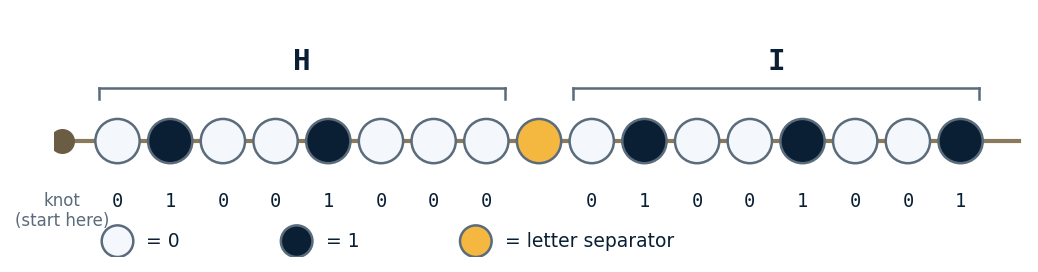
If your word were HI, your finished plan would thread like this.
Thread the Bracelet
-
Cut a length of string sized to your wrist, with a few extra inches added on.
-
Tie a triple knot near one end. The knot marks the start of your data — everything reads away from it.
-
Thread your beads starting at the knot: the first letter's eight bits in order, a separator, the next letter's eight bits, and so on. Work row by row from your table.
-
Check the finished strand against your table, bead for bead, before the final knot.
Warning
There is no insert key on a bracelet. A missing bead found now costs ten seconds; found after the knot, it costs a re-thread.
-
Wrap it around your wrist to check the fit, and note how much slack you need to slip it over your hand.
-
Knot the open end and tie the two ends together, leaving that slack.
-
Trim the extra string, cutting far enough from the knots that they won't loosen.
Checkpoint
You are now wearing a string, in both senses. Photograph it for your notebook before it walks off.
The Decode Challenge
An encoding you can write but not read is only half an agreement. Time to read.
-
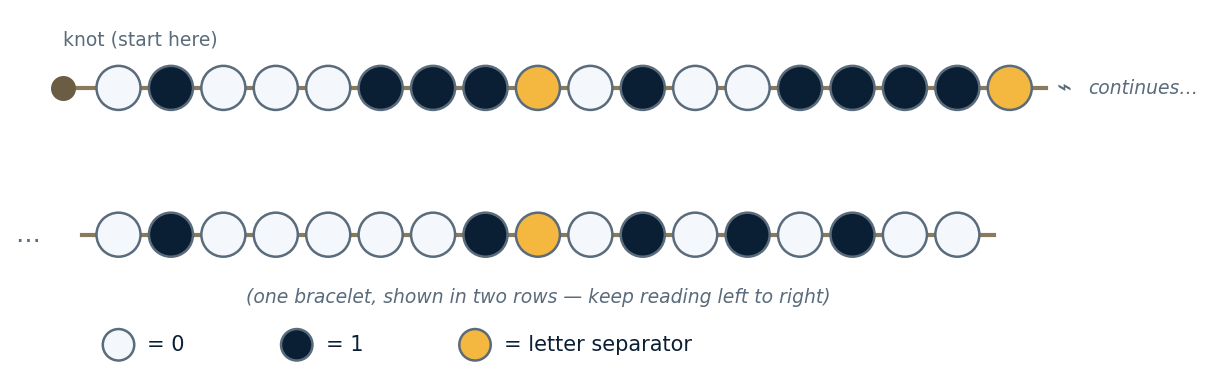
Decode this mystery bracelet in your notebook, using the chart and the legend in the figure. Write the word, not just the bits.
Check your decode
Four letters, and the internet would approve of all of them. If you got a word, you got the word.
-
Trade bracelets with a neighbor — and trade color keys, but not words.
-
Decode their bracelet into your notebook: bits first, then letters.
-
Verify with the owner. If they confirm you read it right, have them initial the decode in your notebook. If they don't — one of you has a bad bit, and finding it together is the fastest debugging practice you'll get all week.
The Number on Your Wrist
Your bracelet stores letters, but the beads themselves are just binary numbers — which means you can do lab 10 math on them.
-
Write the 8-bit codes for your first and last initials in your notebook.
-
Convert each one to decimal using place values, showing your work the same way you did in Binary Numbers Practice.
-
Check yourself: capital
Ais65and the alphabet counts up from there, so your answers should land between65and90.
Challenges
Try these in your notebook if you finish early.
- The size of the agreement. One byte per character — so how many different characters could an 8-bit code support? ASCII's capital letters use only 26 of them. What else would a computer need codes for?
- One bead from lowercase. Look up lowercase
a— it's01100001. Compare it to capitalA,01000001. Exactly one bead differs. What is that one bit doing? - Read it both ways. Your neighbor insists
01000111is the number71. You insist it's the letterG. Who's right, and what settles it?
Turn It In
- Your encoding table — word, 8-bit codes, bead counts, and color key — in your notebook.
- Your initials converted to decimal, place-value work shown, in your notebook.
- A photo of your finished bracelet in your notebook.
- Your neighbor's word, decoded and initialed by its owner, in your notebook.
How It's Graded
This lab is worth up to 4 points. One score covers everything you turn in.
| Score | What it looks like |
|---|---|
| 4 — Excellent | Your table is complete and every byte is correct, the bracelet matches the table bead for bead from the knot, both initials are converted with place-value work shown, and your neighbor's word is decoded and confirmed by its owner — the wrist and the notebook agree. |
| 3 — Above Average | Everything is turned in and readable, with a minor slip — one flipped bit, or a conversion with the right method and one arithmetic error. |
| 2 — Average | Real gaps — a bracelet with no decode or no conversions behind it, or a table and a bracelet that tell two different stories. |
| 1 — Below Average | Beads on a string with no table behind them — that's jewelry, not data storage — or a table with no bracelet and no decode. |
| 0 — Failing | Nothing in the notebook and nothing on the wrist. |
Credit: Adapted from NASA STEM's Make a Binary Bracelet, which draws on a classroom activity from the Chandra X-ray Observatory.