EarSketch: Creating a Beat
So far your song is built from other people's loops. This lab hands you the drumsticks: you'll write your own beat, one character at a time, using a Python string.
Overview
We will create our own beats using Python strings — sequences of text characters — and clean up our code with variables that give our sounds short, usable names.
Before you start
Open your song script in EarSketch. This lab continues the song you've been building.
You've got it when…
- Short variable names have replaced the long sound names in all of your function calls.
- A beat string of your own is stored in a variable.
-
makeBeat()plays your beat string in your song.
Collaboration & AI
Work: On your own.
AI — AIAS Level 1, No AI: The beat should be yours. Write it yourself. What the levels mean.
Variables and Strings
-
Read the following EarSketch Curriculum sections and apply them to your song.
-
Use variables with short names to replace the long names of your selected sounds in all function calls. See Section 3.1 for examples.
-
Create a beat string and store it in a variable. See Section 3.2 for information.
-
Use the
makeBeat()function to use your beat string in your song. See Sections 3.3 and 3.4 for examples and a helpful video about beat strings.
Turn It In
Download your script from EarSketch and submit it:
-
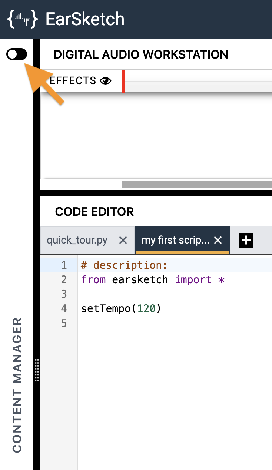
Click the toggle switch to expand the Content Manager.
-
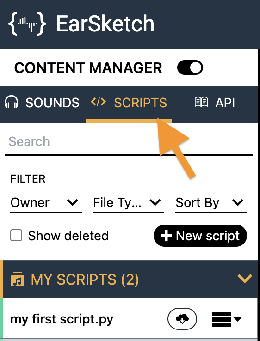
Select the SCRIPTS tab.
-
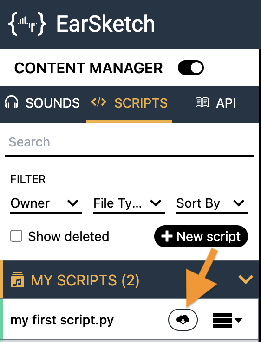
Find your song's script in the MY SCRIPTS panel and click its Download button
 .
.
-
Click the download button
 next to the Script option.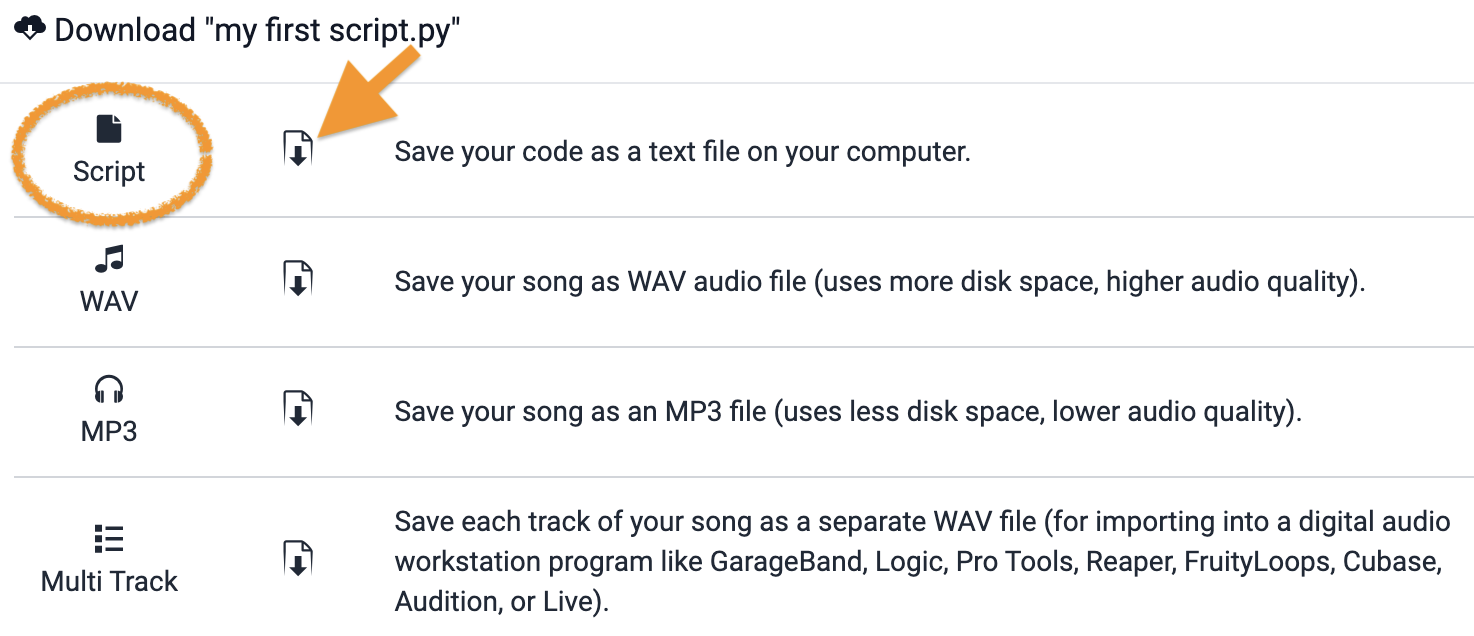
-
Turn in the downloaded Python (
.py) file the way your teacher has asked for it (Google Classroom, your project notebook, or wherever this class collects work).
- Your song's script (
.pyfile), turned in as instructed.
How It's Graded
This lab is worth up to 4 points. One score covers everything you turn in.
| Score | What it looks like |
|---|---|
| 4 — Excellent | Every function call uses a short variable name instead of a long sound constant, your own beat string lives in a variable, and makeBeat() plays it in the song — a beat you wrote, not one you found. |
| 3 — Above Average | All three requirements met; a stray long sound name survives in one call. |
| 2 — Average | Variables done but the beat never happens — no beat string, or one that makeBeat() never plays. |
| 1 — Below Average | The script is unchanged except for a variable or two. |
| 0 — Failing | Nothing turned in. |