EarSketch: Customizing Your Song
A song at 120 beats per minute is a song at the default setting. This lab makes your song yours: you'll set its speed, comment your code so a stranger (or you, next week) can follow it, and add a sound that EarSketch doesn't even have.
Overview
We will customize our song's tempo — its speed in beats per minute — comment our code, and add a new sound from outside of EarSketch.
Before you start
Open your song script in EarSketch. This lab continues the song you started in Getting Started.
You've got it when…
-
setTempo()sets your song to something other than 120 beats per minute. - Your script has at least three useful comments.
- Your song plays at least one custom sound you added from Freesound.
Collaboration & AI
Work: On your own.
AI — AIAS Level 1, No AI: Write your own code and your own comments. What the levels mean.
Tempo, Comments, and Custom Sounds
-
Read the following EarSketch Curriculum sections and apply them to your song.
- Section 2.1
- Section 2.2
- Section 2.3 — Hint: this one shows you how to add a new sound from Freesound.
-
Set a tempo to something other than 120 beats per minute.
-
Have at least three useful comments.
What makes a comment useful?
A useful comment tells the reader something the code can't: why a section exists, not what the line does.
# set the temponext tosetTempo(91)earns no points with anyone. -
Add at least one custom sound from Freesound (see Section 2.3).
Turn It In
Download your script from EarSketch and submit it:
-
Click the toggle switch to expand the Content Manager.
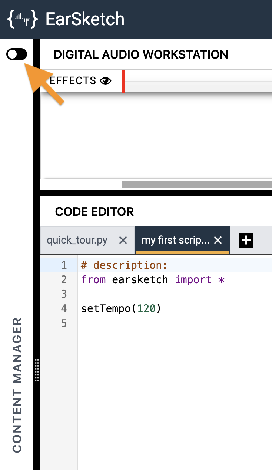
-
Select the SCRIPTS tab.
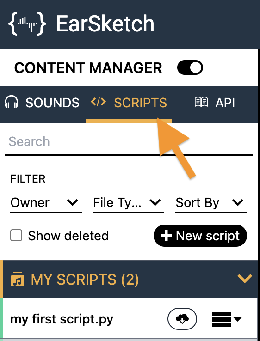
-
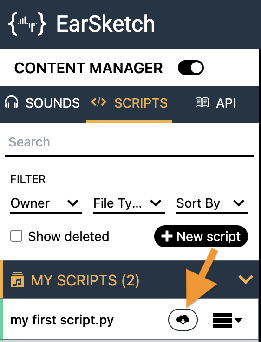
Find your song's script in the MY SCRIPTS panel and click its Download button
 .
.
-
Click the download button
 next to the Script option.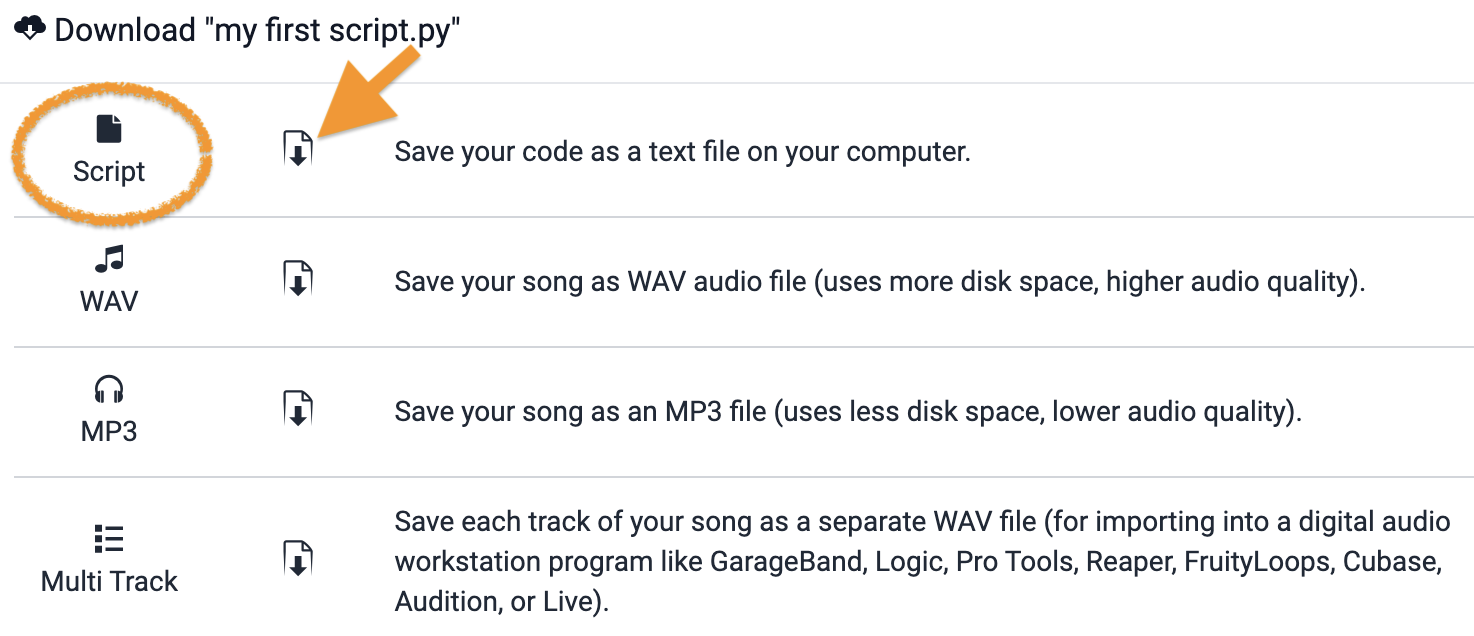
-
Turn in the downloaded Python (
.py) file the way your teacher has asked for it (Google Classroom, your project notebook, or wherever this class collects work).
- Your song's script (
.pyfile), turned in as instructed.
How It's Graded
This lab is worth up to 4 points. One score covers everything you turn in.
| Score | What it looks like |
|---|---|
| 4 — Excellent | A tempo other than 120 that suits the song, three comments that explain why a section exists (not what a line does), and a custom Freesound sound that actually plays in the mix — the script reads like it has an owner. |
| 3 — Above Average | All three requirements present, with a freebie in the mix — a "# set the tempo" comment among the useful ones. |
| 2 — Average | Two of the three — most often the custom sound never made it from Freesound into the song. |
| 1 — Below Average | The song from last lab, resubmitted at 120 beats per minute. |
| 0 — Failing | Nothing turned in. |