EarSketch: Release Day
Every producer eventually has to ship. You've spent this unit learning tracks, beats, loops, effects, functions, and lists — now you'll put them into one final song and release it to your toughest audience: this class. We'll play every song on release day, and the class will vote for a winner. The stakes are bragging rights.
Overview
This is the culminating project for the EarSketch unit. You'll compose one complete, original song that shows off the skills from every lab, export it, and enter it in the class listening party.
You've got it when…
- Your song is a complete piece with a beginning, a middle, and an end.
- Someone reading your script can see every skill from the unit at work.
- You'd play it for the class without apologizing first.
Collaboration & AI
Work: On your own. This song is your work, start to finish.
AI — AIAS Level 1, No AI: The point of a final project is to show what you can do. What the levels mean.
Your Mission
-
Create a new script for your final song. You may reuse ideas — and your best sections — from the unit's labs.
-
Compose a song at least 16 measures long that uses the skills from the unit. The checklist in How It's Graded below is your feature list.
-
Give your song a title. Every release needs one.
The Listening Party
On release day, we'll play every song for the class. Each of you will vote for your top three songs, and you may not vote for your own. The song with the most votes wins the unit — and the accompanying bragging rights.
Info
The vote is a friendly competition, so keep it friendly: the class picks the winner, but the checklist decides your grade. An unpopular song that demonstrates every skill still earns full marks.
Turn It In
Download your final song from EarSketch and submit it — this time you'll turn in the audio along with the script, so we can play it on release day:
-
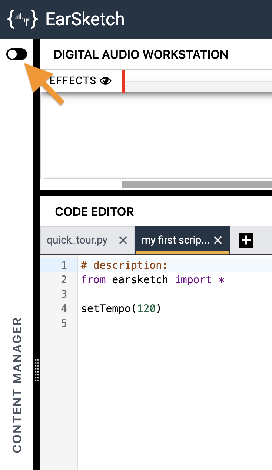
Click the toggle switch to expand the Content Manager.
-
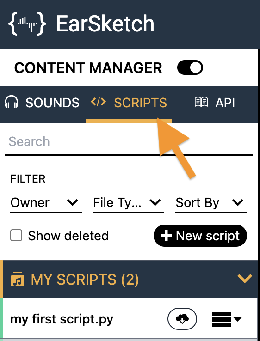
Select the SCRIPTS tab.
-
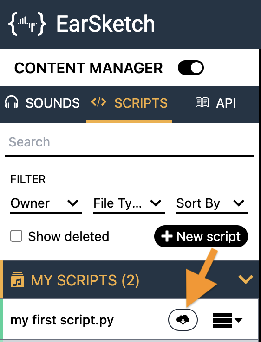
Find your final song's script in the MY SCRIPTS panel and click its Download button
 .
.
-
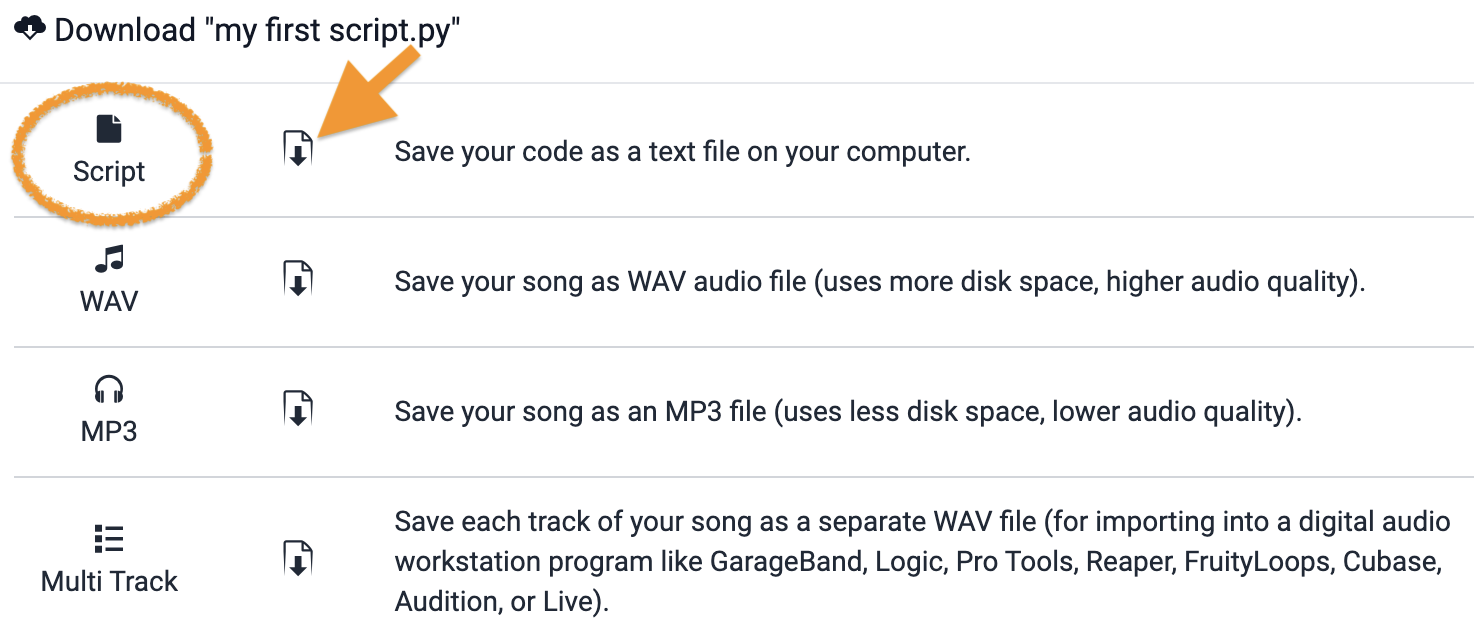
In the download dialog, download both the Script option and the MP3 option.
-
Turn in both files the way your teacher has asked for them (Google Classroom, your project notebook, or wherever this class collects work).
- Your final song's script (
.pyfile), turned in as instructed. - Your final song's audio (
.mp3file), turned in as instructed.
How It's Graded
This lab is worth up to 4 points. One score covers everything you turn in.
| Score | What it looks like |
|---|---|
| 4 — Excellent | A complete, original song of at least 16 measures with a clear beginning, middle, and end, demonstrating every feature on the checklist — set tempo, your own beat string, a loop, effects with an envelope, argument-taking section functions, sounds in a list — with both the script and the MP3 submitted and ready to play at the party. |
| 3 — Above Average | A complete song with one feature missing or thin — an envelope that never changes, a list holding only some of the sounds. |
| 2 — Average | A song that plays but skips several checklist features, or runs short of 16 measures. |
| 1 — Below Average | Fragments of labs stitched together, or a script with no exported audio to play. |
| 0 — Failing | Nothing to play on release day. |