Connect4
You will not be playing Connect 4 in this assignment. You'll be writing a Python library that plays it for you — and then entering your library in a tournament against every other library in the room. Your code takes the turns. You get to watch.
Overview
You'll build a Python library — a module of functions — that plays Connect 4 on behalf of one player automatically: proposing moves, checking the legality of an opponent's moves, and detecting wins and ties. The functions must match the required signatures precisely, because a tournament program will be calling them without you there to explain what you meant.
Builds on: 2D Lists Tic-Tac-Toe — you'll reuse representing a game board as a 2D list and checking it for wins.
You've got it when…
- Your library file is named your first name, all lowercase.
- All four required functions exist with the exact signatures below.
-
check_movecorrectly accepts legal moves and rejects illegal ones. -
check_wincorrectly reports"WIN","TIE", or"IN PROGRESS". -
make_movealways returns a legal column, for any board it is given. - Your functions recover gracefully when passed illegal arguments.
Collaboration & AI
Work: On your own. This is a competition — helping an opponent build their library is a bold strategy.
AI — AIAS Level 1, No AI: The tournament measures your algorithm against theirs. Design it, write it, and test it yourself. What the levels mean.
The Game
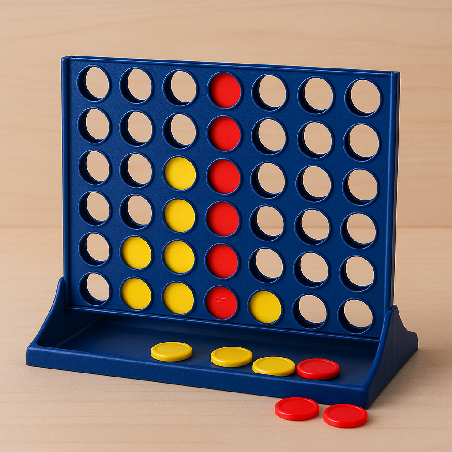
Connect 4 is a two-player strategy game played on a vertical grid with 7 columns and 6 rows. Players take turns dropping one colored disc at a time into any column. The disc falls to the lowest available space in that column.
The goal is simple: Be the first player to form a straight line of four of your own discs.
A winning line of four can be:
- Horizontal (left–right)
- Vertical (up–down)
- Diagonal (either direction)
Rules
- Players take turns one at a time.
- On your turn, drop one piece into any column you want.
- You can't take pieces out once they're in the board.
- The first person to get four in a row wins!
- If the whole board fills up and nobody has four in a row, it's a tie.
Your Mission
You will create a Python library to play Connect4 on behalf of one player automatically. Your library will play against other students' libraries!
The Game State
The game board will be represented by a 2D list. Spaces will either be "-"
for an empty space, "R" for a red piece, or "Y" for a yellow piece. Here
are examples of this data structure.
Creation of an empty game board:
state = [
    ["-", "-", "-", "-", "-", "-", "-"],
    ["-", "-", "-", "-", "-", "-", "-"],
    ["-", "-", "-", "-", "-", "-", "-"],
    ["-", "-", "-", "-", "-", "-", "-"],
    ["-", "-", "-", "-", "-", "-", "-"],
    ["-", "-", "-", "-", "-", "-", "-"],
]
An empty game board (text, as it would be printed to the screen):
A game in progress (text, as it would be printed to the screen):
A win for red (text, as it would be printed to the screen):
Assignment
Create a library. It must follow these rules precisely:
-
Your library file shall be named your first name, all lowercase letters. Example:
steve.py -
Create a function with this exact signature:
This function shall accept two arguments:
piece: a string representing your piece, either"R"or"Y".state: the game board state as described in the previous section.
This function shall return an
intwith the column your program chooses to play. It must be in the range 0 through 6. -
Create a function with this exact signature:
This function shall accept three arguments:
piece: a string representing a piece to be played, either"R"or"Y".column: anintrepresenting the column to be played, 0 through 6.state: the game board state before making this move as described in the previous section.
This function shall return
Trueif the proposed move is legal, orFalseotherwise. -
Create a function with this exact signature:
This function shall accept one argument:
state: the game board state as described in the previous section.
This function shall return one of these strings exactly as spelled here:
"WIN"if a win has occurred"TIE"if a tie has occurred"IN PROGRESS"if the game is still in play
-
Create a function with this exact signature:
This function shall return your first name as a string, properly capitalized.
Warning
"Precisely" means precisely. The tournament program calls your functions
by these exact names and argument lists, and expects the exact return
values described. A misspelled function name or a return value of
"win" instead of "WIN" doesn't earn partial credit — it forfeits
games.
Tournament Flow
- Your library will play against other students' libraries in a tournament.
- Two players are randomly matched for a game.
- A program, which will be provided for you at the time of the tournament, will provide the following flow:
On your turn:
- The program calls your
make_move()function. - The program then calls your opponent's
check_move()on your proposed move.- If your move is illegal and your opponent correctly flags it, you lose.
- If the move is legal, the game state is updated with your move.
- The program calls your
check_win()function.- If you do not return a valid result string (as defined above), you lose.
- If your move actually wins the game and you correctly report this, you win.
- The program then calls your opponent's
check_win()function.- If your move really won the game, you failed to report it, and your opponent correctly reports it, your opponent wins.
- If your move tied the game, you failed to report it, and your opponent correctly reports it, your opponent wins.
Play continues with alternating turns until someone wins (or a tie is correctly reported).
Referees who play, players who referee
Notice that your library is never trusted to referee itself. Your
opponent's check_move and check_win are watching every move you make,
and yours are watching theirs. A library with a sharp check_win can win
games its make_move didn't earn — an opponent that fails to report its
own victory hands the game to you.
Test Cases
Your library should include a main() function that thoroughly tests each
of your three game functions: make_move(), check_move(), and
check_win(). (We'll take get_name() on faith.) You must think of test
cases that show your function will recover gracefully from illegal arguments
being passed to it.
Your main() function must be protected like this:
Why the protection?
Code guarded by if __name__ == "__main__": runs only when your file is
run directly — not when the tournament program imports it as a library.
Without the guard, your tests would run in the middle of the tournament,
which is not the kind of surprise that helps you.
Turn It In
- A detailed description of your algorithm for your
make_move()function. You must describe the process your code will use for choosing a column based on the game state. This should not include any Python code! - Your library Python (.py) file, named exactly as required above.
How It's Graded
This lab is worth up to 4 points. One score covers everything you turn in.
| Score | What it looks like |
|---|---|
| 4 — Excellent | All four functions exist with the exact required signatures in a file named your lowercase first name; check_move and check_win are correct and recover gracefully from illegal arguments; your make_move algorithm description is precise enough that another programmer could implement it without asking you anything — and contains no Python code. |
| 3 — Above Average | The library is complete and tournament-ready with a minor slip — an edge case check_win misses, or an algorithm description that skips a detail your code actually handles. |
| 2 — Average | The functions exist but one misbehaves (a win direction never detected, illegal moves accepted), or the algorithm description reads like Python with the punctuation removed. |
| 1 — Below Average | Required functions missing or misspelled, signatures that don't match, or a library that crashes when the tournament calls it. |
| 0 — Failing | Nothing turned in, or a file the tournament program can't even import. |