Recursion
Piet Mondrian spent decades reducing painting to black lines and rectangles of red, blue, and yellow. You're going to reproduce his life's work with one function — a function whose defining trick is that it calls itself.
Overview
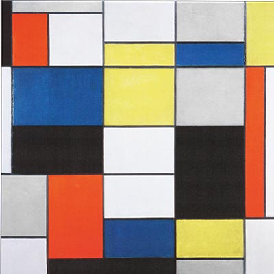
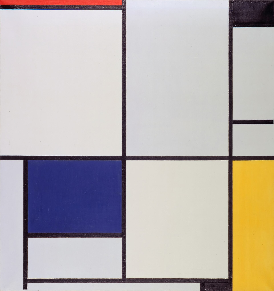
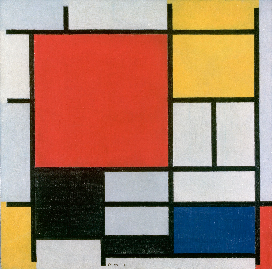
Piet Mondrian (1872–1944) was a Dutch artist. He is best known for his abstract paintings made of black grid lines and blocks of color, primarily red, blue, yellow, and white. His goal was to reduce art to its simplest visual elements and create balance through structure and proportion.
 |
 |
|---|---|
| Composition A (1920) | Tableau I (1921) |
 |
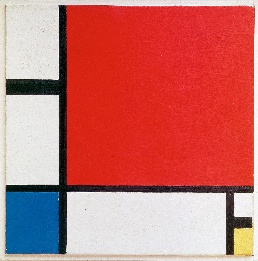 |
| Composition in Red, Yellow, Blue and Black (1921) | Composition II in Red, Blue, and Yellow (1930) |
Although Mondrian didn't use computers, his style connects surprisingly well to the idea of recursion in computer science.
In this assignment, you'll generate a Mondrian-style image by repeatedly subdividing a rectangle into smaller rectangles. This mirrors recursion because:
- You start with one large rectangle
- Apply the same rule: split it into smaller parts
- Then apply that same rule again to each new rectangle
This "repeat the same process on smaller pieces" is exactly what recursion does.
So while Mondrian created his work by hand, your program will recreate a similar visual style using a recursive algorithm, turning an artistic idea into a computational one.
Builds on: Sorting Introduction — another algorithm implemented from a description; this one calls itself.
You've got it when…
- Your program opens a window filled edge-to-edge with a Mondrian-style grid of colored rectangles.
- Every run produces a different painting.
- All of your code lives inside the
subdividefunction. - Changing the
depthargument changes how finely the image is subdivided — and you can explain why.
Collaboration & AI
Work: On your own. Compare paintings with your neighbors — no two should match.
AI — AIAS Level 1, No AI: Recursion has to click in your head, and
it only clicks by writing one. Implement subdivide yourself.
What the levels mean.
Task
-
Copy the code below to a new file in the Mu editor.
import random WIDTH = 800 HEIGHT = 600 mondrian_colors = ["white", "red", "blue", "yellow"] rectangles = [] def draw(): """ DO NOT CHANGE THIS FUNCTION """ screen.fill((220, 220, 220)) for item in rectangles: x, y, w, h, color = item r = Rect(x, y, w, h) screen.draw.filled_rect(r, color) screen.draw.rect(r, (0, 0, 0)) def subdivide(x, y, w, h, depth): """ YOUR CODE GOES HERE """ subdivide(0, 0, WIDTH, HEIGHT, 5) -
Change the Mu editor mode to Pygame Zero.
- Press the Mode button.
- Select Pygame Zero.
Your screen should look like this.

-
Implement the algorithm below in the body of the
subdividefunction. You should not edit anything outside of thesubdividefunction!
The Algorithm
Inputs. The subdivide function is passed arguments/parameters
describing a rectangular area on the screen:
x— the x-coordinate (left-right) of the upper-left corner of the rectangley— the y-coordinate (up-down) of the upper-left corner of the rectanglew— the width of the rectangleh— the height of the rectangledepth— how deep the algorithm should go. We count this down each timesubdivideis called recursively, and smaller and smaller rectangles will be created until it reaches zero.
- Check the stopping condition.
- If
depthis 0:- Choose a random color from the Mondrian color list.
- Store a rectangle at
(x, y)with the given width and height using that color. For this assignment, represent a rectangle as a tuple of(x, y, width, height, color). Append this tuple to therectangleslist. - Stop (do not continue).
- If
- Decide how to split the rectangle.
- If the width is greater than the height: split vertically.
- Otherwise: split horizontally.
- Choose a split location.
- Pick a random number between about 30% and 70% of the dimension being split.
- Create two smaller rectangles.
- If splitting vertically:
- Left rectangle: same
y, height stays the same, width = split value. - Right rectangle:
xstarts atx + split, width = remaining width.
- Left rectangle: same
- If splitting horizontally:
- Top rectangle: same
x, width stays the same, height = split value. - Bottom rectangle:
ystarts aty + split, height = remaining height.
- Top rectangle: same
- If splitting vertically:
- Repeat the process.
- Call
subdivideon each of the two new rectangles. - Decrease
depthby 1 for each call.
- Call
Why the stopping condition comes first
A recursive function without a stopping condition is an infinite loop
with better manners: each call spawns more calls, forever, until Python
runs out of room to keep track of them all. Step 1 is what makes the
whole thing land — the recursion drills down, hits depth 0, and starts
actually storing rectangles.
Questions
Save your work first!
It is highly likely that Mu will crash during this step!
Try changing the depth argument on the last line of the program:
- What happens as this number is increased?
- What limits how large you can make this number?
- What is the purpose of doing this task recursively? How would you go about doing this iteratively (with a loop) instead?
Turn It In
- Your answers to the three Questions above, in your notebook.
- Your Python (.py) file.
How It's Graded
This lab is worth up to 4 points. One score covers everything you turn in.
| Score | What it looks like |
|---|---|
| 4 — Excellent | Your program fills the window edge-to-edge with a Mondrian-style grid, paints a different composition every run, keeps all your code inside subdivide — and your notebook answers all three questions with reasons, including what actually limits depth and how you'd do the job with a loop instead. |
| 3 — Above Average | The painting works; the question answers are thin — a depth limit guessed at rather than tested. |
| 2 — Average | The program draws something, but the recursion isn't finishing the job — gaps in the canvas, one lonely rectangle — or the questions went unanswered. |
| 1 — Below Average | The program doesn't run, or code was written outside subdivide (including the draw function marked do-not-change). |
| 0 — Failing | No program and no answers. |