Turtle Power
Figure 1: Turtles in their natural habitat. This is real.
You're going to steer a turtle around the screen with code, leaving a trail behind it. First a maze, then a map of the neighborhood — with a very specific destination in mind.
Overview
Turtle graphics uses a "turtle" (a cursor) that moves around the screen, leaving a trail. By commanding it to move, turn, and change color, you can draw shapes, patterns, and whole pictures. In this lab you'll program the turtle to walk the solution to a maze, then to a map.
Before you start
The turtle library is built into Python — no install needed. Start a new program to use it.
You've got it when…
- Your turtle walks from a starting triangle through the maze.
- Your turtle travels from the NPA STEAM building to the Dutch Bros on the map.
Collaboration & AI
Work: On your own. Ask a neighbor if you're stuck, but drive your own turtle.
AI — AIAS Level 1, No AI: Work out the turns and distances yourself. What the levels mean.
Introducing Turtle Graphics
To use the turtle library, we start by importing it.
These commands are then available to make our graphic:
| Command | Description |
|---|---|
turtle.forward(distance) |
Move forward by distance, in the direction the turtle is headed. |
turtle.backward(distance) |
Move backward by distance, opposite the heading. |
turtle.goto(x, y) |
Move to a specific location. The origin (0, 0) is the center of the screen. |
turtle.home() |
Move to the origin (0, 0) and reset the heading. |
turtle.right(angle) |
Turn right by angle degrees. |
turtle.left(angle) |
Turn left by angle degrees. |
turtle.penup() |
Pick the pen up — no drawing while moving. |
turtle.pendown() |
Put the pen down — draw while moving. |
turtle.pensize(width) |
Change the thickness of the line. |
turtle.pencolor(colorstring) |
Set the pen color, e.g. "red", "yellow". |
turtle.bgcolor(color) |
Change the background color. |
turtle.circle(radius) |
Draw a circle with the given radius. |
turtle.dot(size, color) |
Draw a dot of the given size and color. |
turtle.clear() |
Erase everything in the graphics window. |
turtle.shape("turtle") |
Set the turtle's shape: "arrow", "turtle", "circle", "square", "triangle", or "classic". |
Turtle Maze
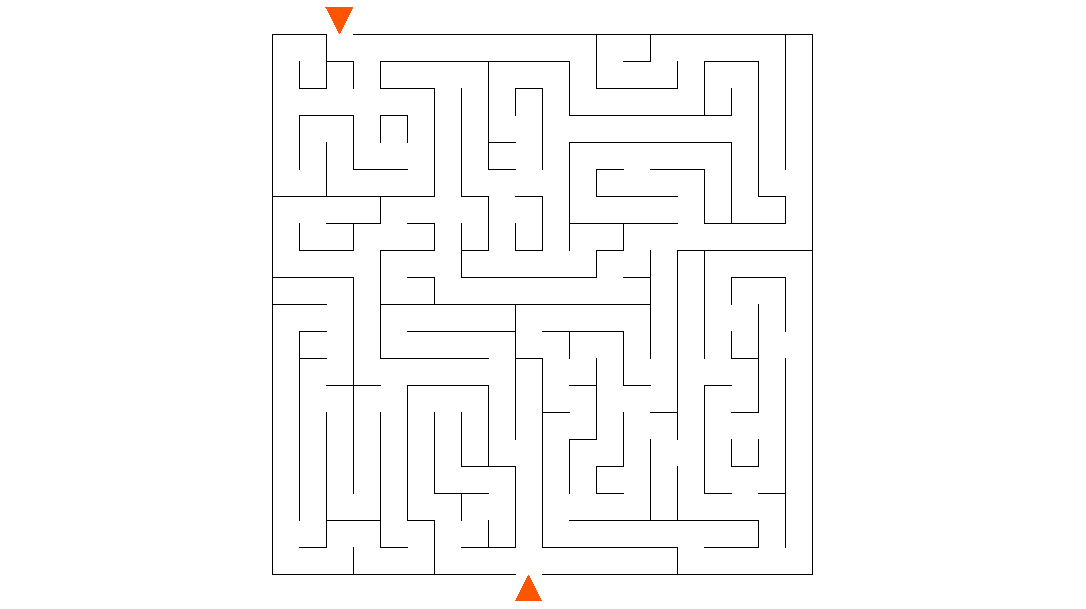
We'll program the turtle to walk the solution of a maze.
-
Create a new file named
maze.pywith the following content. -
Put
maze.gifin the same folder asmaze.py.Warning
turtle.bgpic()only loads GIF images, and the file must sit in the same folder as your program or the turtle won't find it. -
Edit the
gotoarguments on line 6 to place the turtle at one of the maze's starting triangles. This takes some trial and error. - Starting on line 9, add commands from the table above to guide the turtle through the maze.
Turtle Map

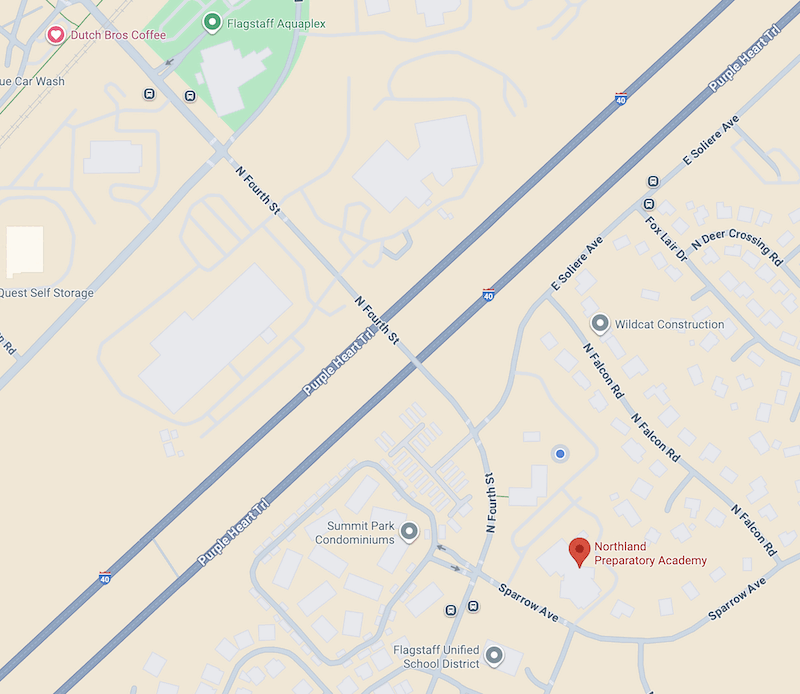
Figure 2: Goals.
The maze was a lot of work, and our turtle could go for a Poppin' Boba Berry Lemonade from Dutch Bros.
- Create a new file named
map.py. Start from a copy of yourmaze.py. - Put
map.gifin the same folder asmap.py, and changebgpicto loadmap.gif. - Modify the program to guide the turtle from the NPA STEAM building (the blue dot) to the Dutch Bros.
Turn It In
-
maze.py -
map.py
You do not need to submit the image files.
How It's Graded
This lab is worth up to 4 points. One score covers everything you turn in.
| Score | What it looks like |
|---|---|
| 4 — Excellent | Both programs work: in maze.py the turtle starts at a starting triangle and draws a path through the maze without cutting through walls, and in map.py it travels from the NPA STEAM building to the Dutch Bros. The routes are navigated with movement and turn commands, and the pen is down where the trail matters. |
| 3 — Above Average | Both programs run and reach their destinations, with a minor slip — a clipped corner, a grazed wall, or a trail that starts a step late. |
| 2 — Average | One of the two programs works, or the turtle "solves" the maze by jumping straight through walls to the exit. |
| 1 — Below Average | Neither program completes its route, or the turtle never leaves the start. |
| 0 — Failing | Nothing submitted, or no evidence the turtle ever moved. |